RTコンポーネント作成の基本
データポートのあるコンポーネント
ここでは、データポートのあるコンポーネントを二つ作成し、二つのコンポーネント間でデータの送受信を行ってみます。 作成するコンポーネントの仕様は以下の通りです。
- コンポーネント1
- OutPort を一つもつ
- OutPort のデータ型は TimedLong
- コンソールから入力した値を OutPort から出力
- コンポーネント2
- InPort を一つ持つ
- InPort のデータ型は TimeLong
- コンフィギュレーションパラメーターを一つ持つ
- コンフィギュレーションパラーメーターは int型
- コンフィギュレーションパラーメーターのデフォルト値は1
- InPort 変数から読み出すときはパラメーターを掛けた値を読み出す
- InPort から読み出した値をコンソールへ出力
rtc-template によるソース生成
上記の仕様を持つコンポーネントを作成する為に以下のようなシェルスクリプトを gen.sh という名前で用意します。
 #!/bin/sh

 rtc-template -bcxx      --module-name=ConsoleIn --module-type='DataFlowComponent'      --module-desc='Console input component'      --module-version=1.0 --module-vendor='MyName'      --module-category=example      --module-comp-type=DataFlowComponent --module-act-type=SPORADIC      --module-max-inst=10 --outport=out:TimedLong

 rtc-template -bcxx      --module-name=ConsoleOut --module-type='DataFlowComponent'      --module-desc='Console output component'      --module-version=1.0 --module-vendor='MyName'      --module-category=example      --module-comp-type=DataFlowComponent --module-act-type=SPORADIC      --module-max-inst=10 --inport=in:TimedLong      --config="multiply:int:1"
最初の rtc-template の実行でコンポーネント1:ConsoleInComp、次の rtc-template の実行でコンポーネント2:ConsoleOutComp が作成されます。
 > sh gen.sh
   File "ConsoleIn.h" was generated.
   File "ConsoleIn.cpp" was generated.
   File "ConsoleInComp.cpp" was generated.
   File "Makefile.ConsoleIn" was generated.
   File "ConsoleInComp_vc8.vcproj" was generated.
   File "ConsoleIn_vc8.vcproj" was generated.
   File "ConsoleInComp_vc9.vcproj" was generated.
   File "ConsoleIn_vc9.vcproj" was generated.
   File "ConsoleIn_vc8.sln" was generated.
   File "ConsoleIn_vc9.sln" was generated.
   File "copyprops.bat" was generated.
   File "user_config.vsprops" was generated.
   File "README.ConsoleIn" was generated.
   File "ConsoleIn.yaml" was generated.
   File "ConsoleOut.h" was generated.
   File "ConsoleOut.cpp" was generated.
   File "ConsoleOutComp.cpp" was generated.
   File "Makefile.ConsoleOut" was generated.
   File "ConsoleOutComp_vc8.vcproj" was generated.
   File "ConsoleOut_vc8.vcproj" was generated.
   File "ConsoleOutComp_vc9.vcproj" was generated.
   File "ConsoleOut_vc9.vcproj" was generated.
   File "ConsoleOut_vc8.sln" was generated.
   File "ConsoleOut_vc9.sln" was generated.
 "copyprops.bat" already exists. Overwrite? (y/n)y
   File "copyprops.bat" was generated.
 "user_config.vsprops" already exists. Overwrite? (y/n)y
   File "user_config.vsprops" was generated.
   File "README.ConsoleOut" was generated.
   File "ConsoleOut.yaml" was generated.
ConsoleIn の実装
生成されたソースを編集して、ConsoleIn コンポーネントを実装していきます。
ConsoleIn.h
このコンポーネントはアクティブ化されたときに、入力待ちを行い入力された値を OutPort から出力するコンポーネントです。 従って、アクティブ状態の時にループ実行される onExecute メンバ関数のみ実装すればよいので、生成された ConsoleIn.h を以下のようにコメントアウトされている onExecute 関数のコメントをはずします。
     :略
   // The execution action that is invoked periodically
   // former rtc_active_do()
   virtual RTC::ReturnCode_t onExecute(RTC::UniqueId ec_id);
     :略
また、ConsoleIn.h の下の方に、rtc-template で指定した OutPort の変数宣言があります。
     :略
   // DataOutPort declaration
   // <rtc-template block="outport_declare">
   TimedLong m_out;
   OutPort<TimedLong> m_outOut;
   // </rtc-template>
TimedLong m_out と宣言されているのが、OutPort にバインドされる変数。
OutPort<TimedLong> m_outOut と宣言されているのが、OutPort のインスタンスです。
ConsoleIn.cpp
ConsoleInの 実装は簡単です。 コメントアウトされている onExecute のコメントをはずし、以下のように実装します。
 RTC::ReturnCode_t ConsoleIn::onExecute(RTC::UniqueId ec_id)
 {
   std::cout << "Please input number: ";
   std::cin >> m_out.data;
   std::cout << "Sending to subscriber: " << m_out.data << std::endl;
   m_outOut.write();

   return RTC::RTC_OK;
}- cin >> m_out.data でユーザーからの入力待ちをする。
- 入力された値を、m_out.data(long型) へ格納
- 入力された値を確認の為表示
- m_outOut.write() で OutPort からデータを出力。
ConsoleOut の実装
ConsoleOut コンポーネントは少し複雑です。 InPort に入ってきたデータにコンフィギュレーションパラメーター multiply を掛けた値を格納しなければなりません。 これは、InPort にコールバックオブジェクトをセットするという方法で実現できます。
コールバックオブジェクト
コールバックオブジェクトとは、InPort や OutPort のバッファにあるイベントが発生したときに呼ばれるoperator()が定義されたオブジェクトです。 今回は、InPort のバッファに書き込まれるときに値を変換する為のコールバック OnWriteConvert を使用します。
RTC::OnWriteConvert を継承して以下のようなクラスを定義します。
 class Multiply
   : public RTC::OnWriteConvert<RTC::TimedLong>
 {
   int& m_mul;
 public:
   Multiply(int& multiply) : m_mul(multiply) {};
   RTC::TimedLong operator()(const RTC::TimedLong& value)
   {
     RTC::TimedLong ret(value);
     ret.data = value.data * m_mul;
     return ret;
   };
 };
ConsoleOut.h
上記のコールバッククラスを ConsoleOut.h の include の行の直後に挿入します。 さらに、このコールバッククラスのインスタンスを ConsoleOut クラスのメンバ変数として宣言します。 場所は、private のすぐ下辺りでよいでしょう。
 private:
   Multiply m_owc;
   int dummy;
このコンポーネントはアクティブ化されたときに、InPort からデータを読み込み標準出力にデータを表示するコンポーネントです。 従って、アクティブ状態の時にループ実行される onExecute メンバ関数のみ実装すればよいので、生成された ConsoleOut.h を以下のようにコメントアウトされている onExecute 関数のコメントをはずします。
     :略
   // The execution action that is invoked periodically
   // former rtc_active_do()
   virtual RTC::ReturnCode_t onExecute(RTC::UniqueId ec_id);
     :略
また、ConsoleOut.h の下の方に、rtc-template で指定したコンフィギュレーション変数の宣言と InPort の変数宣言があります。
ConsoleOut では InPort のバッファとして RingBuffer を使用するので、RingBuffer.h をインクルードする必要があります。 ConsoleOut.h の先頭部分をで以下のように RingBuffer.h をインクルードしてください。
 #include <rtm/idl/BasicDataTypeSkel.h>
 #include <rtm/Manager.h>
 #include <rtm/DataFlowComponentBase.h>
 #include <rtm/CorbaPort.h>
 #include <rtm/DataInPort.h>
 #include <rtm/DataOutPort.h>
 #include <rtm/RingBuffer.h> //これを追加する
また、InPort の宣言部分でデフォルトでは InPort<TimedLong> m_inIn となっているところを InPort<TimedLong, RTC::RingBuffer> m_inIn のように書き換えて、InPort が RingBuffer を使用するように変更してください。
     :略
   // Configuration variable declaration
   // <rtc-template block="config_declare">
   int m_multiply;

   // </rtc-template>

   // DataInPort declaration
   // <rtc-template block="inport_declare">
   TimedLong m_in;
   InPort<TimedLong, RTC::RingBuffer> m_inIn;
int m_multiplyと宣言されているのが、コンフィギュレーション「multiply」にバインドされる変数。
TimedLong m_in と宣言されているのが、InPort にバインドされる変数。
InPort<TimedLong> m_inIn と宣言されているのが、InPort のインスタンスです。ConsoleOut.cpp
ConsoleOutクラスのコンストラクタで、先ほど定義した Multiply のインスタンスの初期化を追加します。
 ConsoleOut::ConsoleOut(RTC::Manager* manager)
   : RTC::DataFlowComponentBase(manager),
     // <rtc-template block="initializer">
     m_inIn("in", m_in),

     // </rtc-template>
     m_owc(m_multiply),
dummy(0)「m_owc(m_multiply),dummy(0)」 の部分を追加するだけでなく、「m_inIn("in", m_in)」を「m_inIn("in", m_in),」と変更することも忘れずに(カンマ「,」の追加もれに注意)。
さらに、コールバックオブジェクトを InPort に追加する為、コンストラクタ内で以下のように記述します。
   m_inIn.setOnWriteConvert(&m_owc); //これを追加
   // Registration: InPort/OutPort/Service
   // <rtc-template block="registration">
   // Set InPort buffers
   registerInPort("in", m_inIn);
コメントアウトされている onExecute のコメントをはずし、以下のように実装します。
 RTC::ReturnCode_t ConsoleOut::onExecute(RTC::UniqueId ec_id)
 {
   if (m_inIn.isNew())
     {
       m_inIn.read();
       std::cout << "Received: " << m_in.data << std::endl;
       std::cout << "TimeStamp: " << m_in.tm.sec << "[s] ";
       std::cout << m_in.tm.nsec << "[ns]" << std::endl;
     }
   usleep(1000);

   return RTC::RTC_OK;
}- m_inIn.isNew() で InPort にデータが入ってきているかチェックする。
- isNew() というメンバ関数は RingBuffer に定義されている関数です。
- 新しいデータが入っていたら、m_inIn.read() で変数にデータを読み込む。
- そのデータ (m_in.data) を表示する。
コンパイル
実装が終わったら以下のようにソースをコンパイルします。
 > make -f Makefile.ConsoleIn
 > make -f Makefile.ConsoleOut
コンパイルエラーが出た場合はスペルミスなどがないかどうかチェックして再度コンパイルを行ってください。
実行
- ネームサーバ起動していることを確認します。
- 適切な rtc.conf * を作成しておきます。
* 適切な rtc.conf とは… 次に一例をしめします。corba.nameservers: localhost naming.formats: %h.host_cxt/%n.rtc
- 二つのターミナルから、ConsoleInComp および ConsoleOutComp を実行します。
- RtcLink を起動して、二つのコンポーネントを接続し、アクティブ化します。
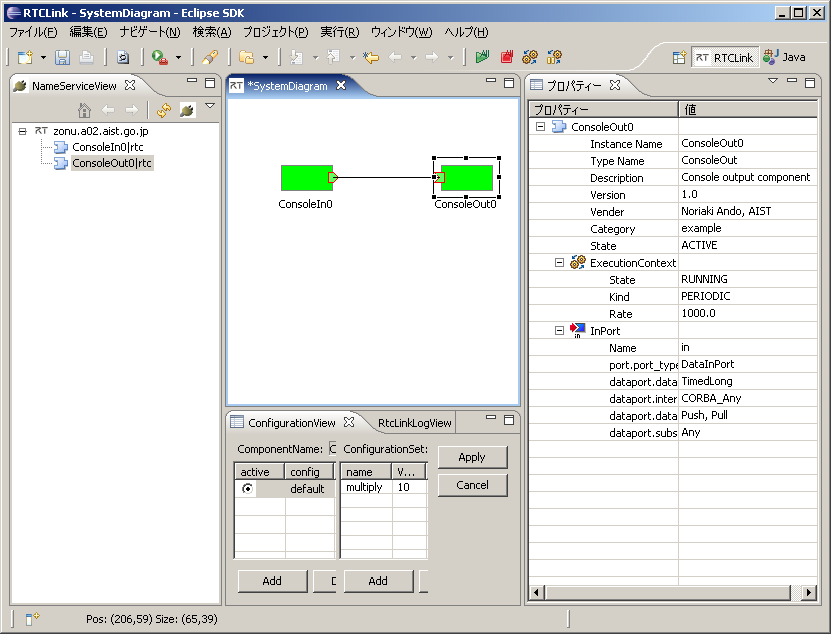
ConsoleIn を実行したターミナルで、入力を促す Please input number: という表示が出るので、適当な数字を入力します。
 Please input number: 1
 Sending to subscriber: 1
 Please input number: 2
 Sending to subscriber: 2
 Please input number: 3
 Sending to subscriber: 3
ConsoleOut を実行したターミナルでは、以下のように表示されるはずです。
 Received: 1
 TimeStamp: 0[s] 0[ns]
 Received: 2
 TimeStamp: 0[s] 0[ns]
 Received: 3
 TimeStamp: 0[s] 0[ns]
次に RtcLink のコンフィギュレーションビューで multiply の値を10に変更してみましょう。すると、ConsoleIn から上記のように入力すると、以下のようにそれぞれ10倍された値が出力されるはずです。
 Received: 10
 TimeStamp: 0[s] 0[ns]
 Received: 20
 TimeStamp: 0[s] 0[ns]
 Received: 30
 TimeStamp: 0[s] 0[ns]
